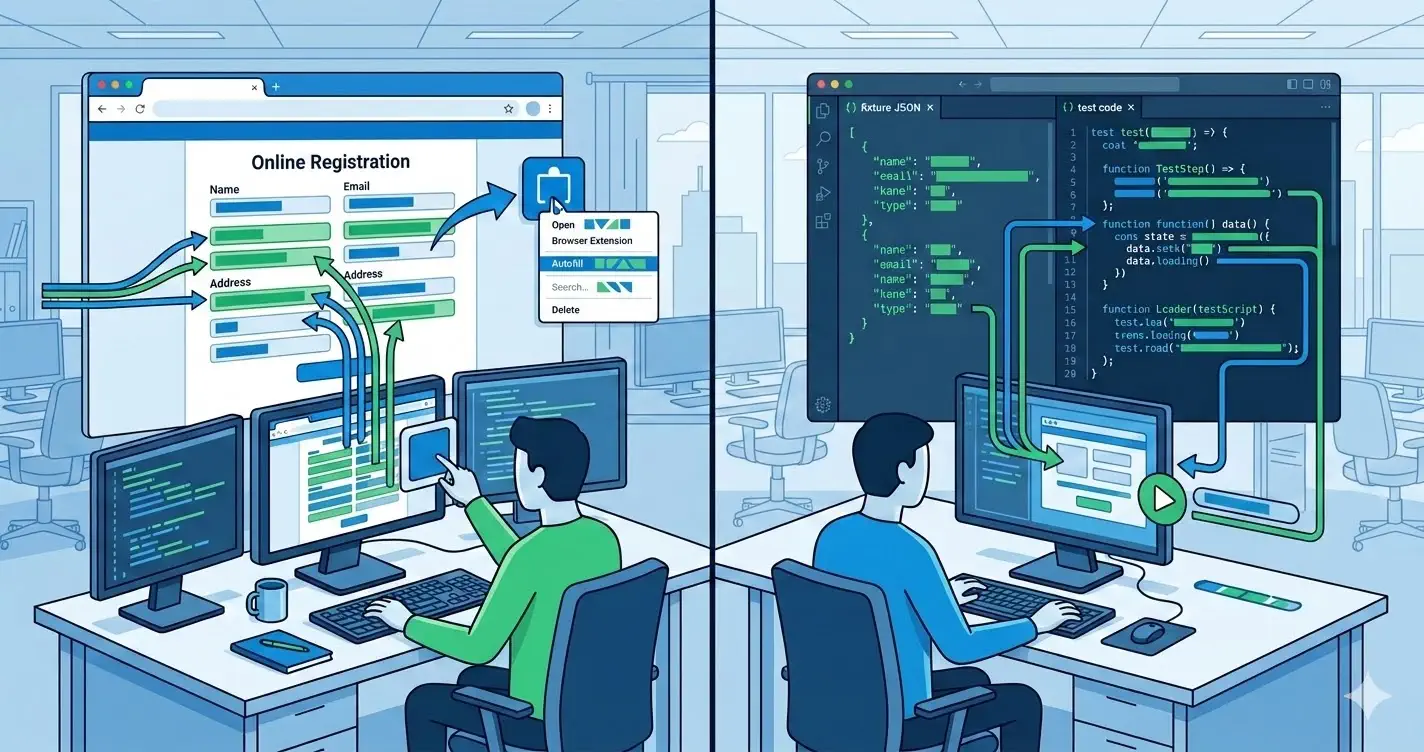
Teams often frame form testing as a choice between automated fixtures and manual entry. That framing is too narrow. In practice, the most effective workflows combine deterministic fixtures with browser-native generated data.
The important question is not which tool is universally better. It is which tool gives you the best signal for the stage of work you are in.
This page is not a buyer's guide for a form filler Chrome extension. It is a workflow architecture decision: when should the team rely on fixtures, browser-generated input, or a layered combination of both?
Fixtures are strongest when repeatability matters most
Fixtures give you controlled inputs that can be replayed across environments and CI runs.
They are ideal for:
- unit and integration tests
- regression suites in Playwright or Cypress
- backend contract tests
- bug reproduction for known edge cases
A fixture is a precise statement: "this input should always produce this outcome." That is extremely valuable when a team is locking down behavior.
Here is a simple example used in an end-to-end test:
const checkoutFixture = {
  fullName: 'Casey Rivera',
  email: 'casey.rivera@example.test',
  addressLine1: '212 River Stone Avenue',
  city: 'Austin',
  state: 'TX',
  postalCode: '78701',
}

await page.getByLabel('Full name').fill(checkoutFixture.fullName)
await page.getByLabel('Email').fill(checkoutFixture.email)
await page.getByLabel('Address line 1').fill(checkoutFixture.addressLine1)
It is explicit and reproducible. That makes it excellent for CI.
Browser-based generated data is strongest when exploring real UI behavior
Fixtures do not fully simulate how humans move through forms in day-to-day work. During exploratory QA, product reviews, and staging checks, teams often need speed more than determinism.
That is where browser-driven generated data is useful.
It helps when you need to:
- populate long multi-step forms quickly
- test pages outside the automated suite
- validate flows on localhost or temporary preview URLs
- reproduce UI issues while staying inside the real browser context
- swap between plausible personas without maintaining dozens of JSON files
The strength is immediacy. You stay close to the actual user interface, but you remove repetitive typing from the loop.
Use fixtures for assertions, extensions for throughput
A good rule of thumb:
- if the outcome must be asserted in CI, prefer fixtures
- if the task is exploratory, repetitive, or review-oriented, prefer browser-side generated inputs
This avoids a common anti-pattern where teams try to encode every manual scenario as fixture data. That creates maintenance overhead and still fails to cover ad hoc checks that happen during development.
Localhost and staging change the equation
On localhost and staging, browser-native tools gain another advantage: they work where production-like automation is often incomplete.
For example, developers frequently need to test:
- half-finished onboarding steps
- password-protected staging URLs
- admin forms behind temporary flags
- local schemas that are not deployed anywhere else
In those situations, a browser extension or generated-input helper gives immediate leverage without waiting for formal test coverage to catch up.
The risk profile is different too
Fixtures are code artifacts. They can be reviewed, versioned, and diffed.
Generated browser input is more interactive. That makes it faster, but it also means teams should define guardrails:
- use synthetic-safe domains and identifiers
- avoid real third-party side effects in shared environments
- document which personas map to which flows
- keep critical assertions in automated tests, not only in manual passes
The right workflow is not "manual instead of automated." It is "manual acceleration plus automated guarantees."
A practical split for most teams
If you are designing a sane process, split responsibilities like this:
- Use fixtures in automated tests for contract coverage and CI stability.
- Use browser-generated data during exploratory QA, demos, and fast local validation.
- Convert any repeatedly discovered bug into a deterministic fixture-based regression test.
That third step matters most. Manual discovery creates insight; automated tests preserve it.
What mature teams optimize for
Mature teams optimize for cycle time and confidence at the same time.
They do not waste senior engineering time typing the same onboarding data into forms. They also do not rely on informal manual checks to protect revenue-critical flows.
The better pattern is layered:
- fixtures for repeatability
- generated browser input for speed
- server validation for truth
- analytics verification for business correctness
That stack reflects how modern form QA actually works.